-
📁 Phase 1 — KYC Introduction & Requirements
-
📁 Phase 2 — Customer Onboarding in Odoo
-
📁 Phase 3 — Document Collection
-
📁 Phase 4 — Document Upload & Verification
-
📁 Phase 5 — KYC Review & Approval
-
📁 Phase 6 — Document Expiry & Renewal
-
📁 Phase 7 — Compliance Reporting
-
- Join this Course to access resources
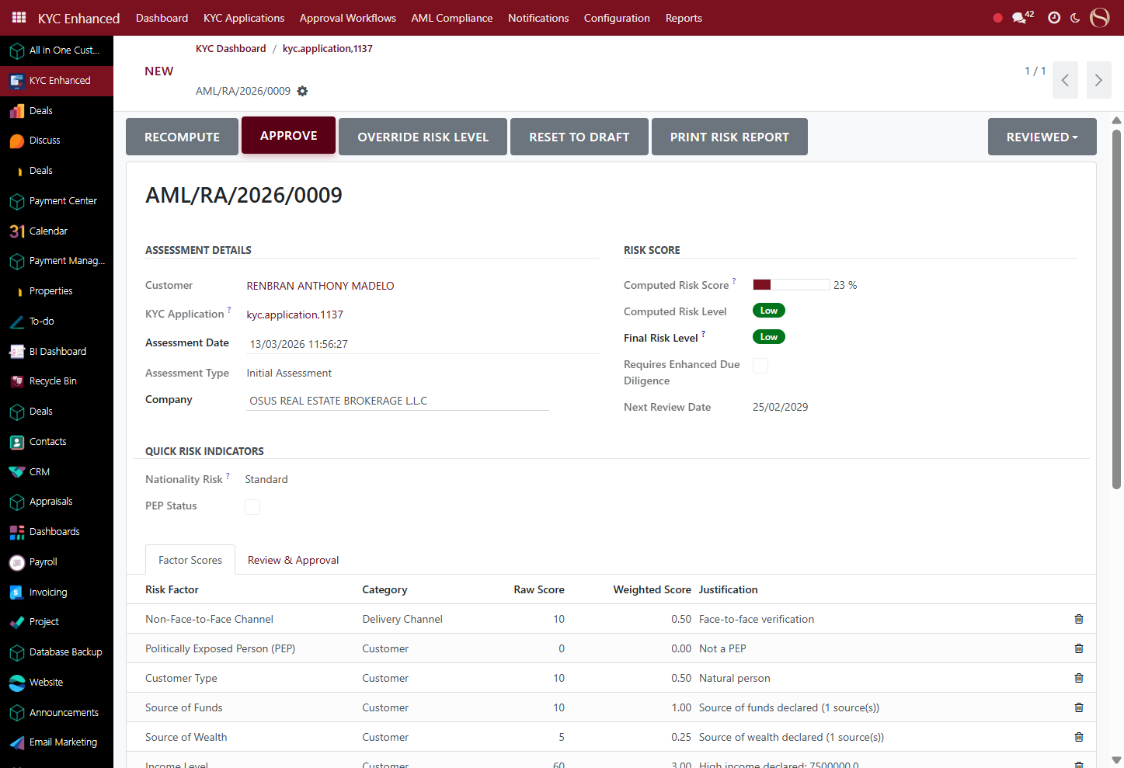
5.4 — Approve KYC (Compliance Only)
📍 WHERE TO FIND IT
Sales ▸ Contacts ▸ [Customer] ▸ Approve KYC
✅ WHAT TO DO
The Approve KYC button is reserved for Compliance Officers only.
- Click 'Approve KYC' (only visible to Compliance role)
- Odoo logs: approved by, timestamp, IP address
- Status changes to 'Approved' — green badge appears
- Customer can now transact in Odoo
1
2
3
💡 TIP
This is a CONTROLLED action. Only Compliance Officers can approve. Agents who attempt to bypass this control will be flagged for audit.
Rating
0
0
There are no comments for now.
Join this Course
to be the first to leave a comment.